 4G SIM News
The Milesight UR35 is one of the most capable industrial 4G LTE routers you can specify for a UK deployment right now. It sits in that sweet spot between a compact single-SIM gateway and a full 5G edge platform: dual SIM failover, real serial ports, isolated digital I/O, a proper industrial protocol stack, and a build that shrugs off the temperature extremes of a roadside cabinet or a rooftop plant room.
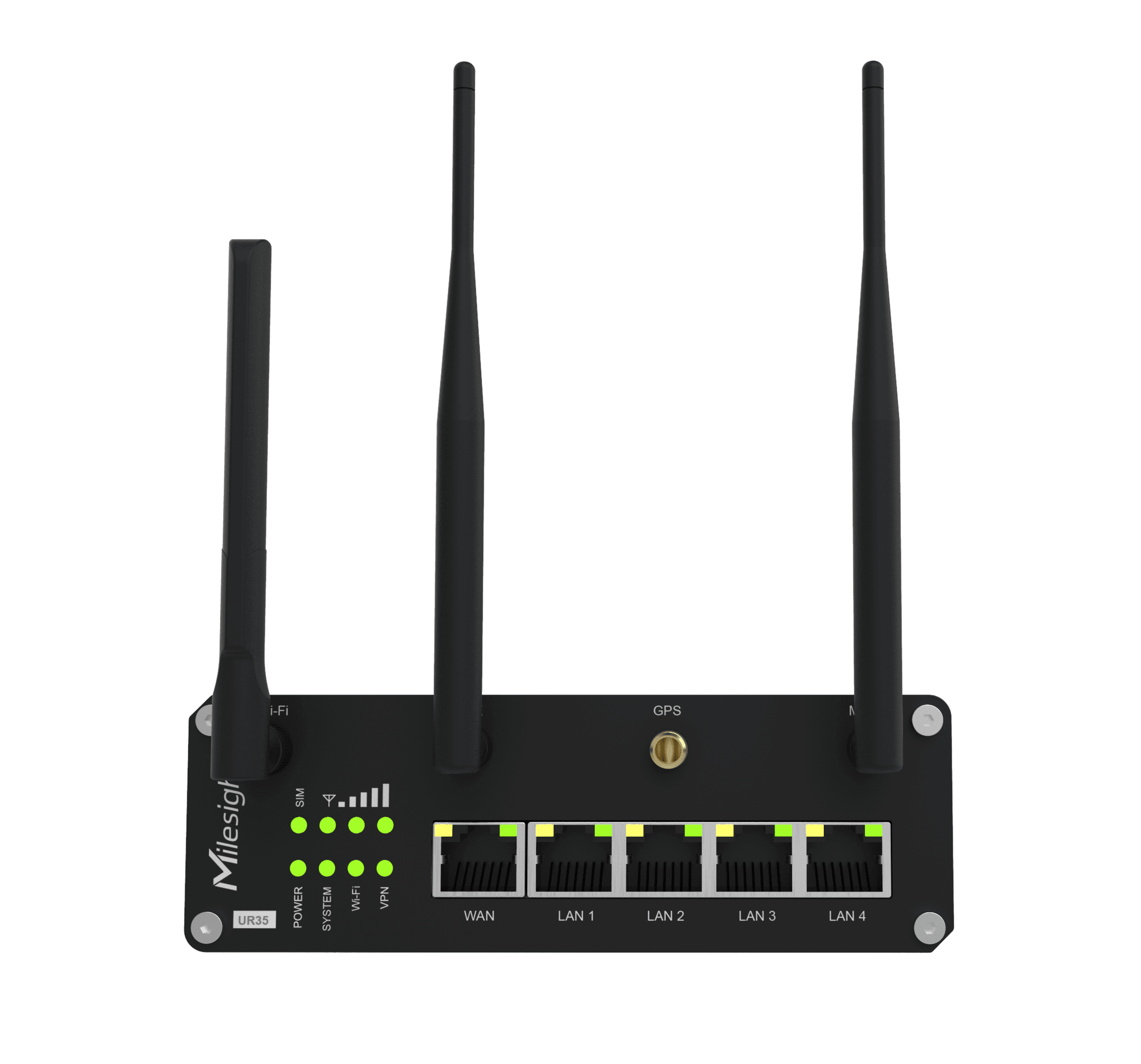
This guide covers the whole UR35 family. There are four variants in the range, and the only differences between them are Wi-Fi and PoE. Everything else, the cellular modem, the serial interfaces, the I/O, the VPN suite, the DLMS and Modbus support, is identical across all four. So the buying decision is genuinely simple once you understand what each model adds.
We’ll walk through the range as a whole, break down each of the four models with the applications they suit, explain exactly how the UR35 solves the problems it’s aimed at, and point you to where to buy it in the UK with next working day delivery, the SIM cards to run it on, and the antennas to get it connected.
Quick note on where to buy: the UR35 range is stocked and supported in the UK by routerstore.com, the leading Milesight distributor in the country. UK stock, UK-based technical support, next working day delivery on orders placed before 3pm, plus IoT SIM cards, fixed IP SIMs and cellular antennas to complete the deployment. More on that below, but if you already know what you need, that’s the fastest route to a working install.
What is the Milesight UR35?
The Milesight UR35 is an industrial-grade cellular router built for machine-to-machine (M2M) and Internet of Things (IoT) applications. In plain terms, it takes a remote site or a piece of remote equipment and puts it reliably on the internet over the mobile network, then gives you the tools to manage, secure and talk to whatever is connected behind it.
It runs 4G LTE Cat 4, which delivers up to 150 Mbps download and 50 Mbps upload, with automatic fallback to 3G and 2G where 4G isn’t available. That’s more than enough throughput for telemetry, SCADA, remote access, metering backhaul, payment terminals, IP cameras and the vast majority of industrial connectivity jobs. It is not a router you buy for raw speed; it is a router you buy because it will still be online in three years’ time in a cabinet nobody has opened since installation.
The things that make it an industrial router rather than a consumer 4G box:
- Dual SIM with automatic failover. Two Mini SIM (2FF) slots. Put a SIM from two different carriers in, and if one network drops the router switches to the other without intervention. Configured once, it just works.
- Real serial ports. One RS232 and one RS485 on a proper terminal block, from 300 to 230400 bps. This is what connects the router to PLCs, meters, RTUs and legacy serial equipment.
- Isolated digital I/O. One isolated digital input and one isolated digital output for alarms, door contacts, tamper switches and relay control.
- Industrial protocol stack. Modbus RTU to TCP gateway, DLMS/COSEM client, MQTT, SNMP and TR069 all built in. This is the difference between a router that carries data and a router that understands the data.
- A serious VPN suite. OpenVPN, IPsec, WireGuard, ZeroTier, GRE, L2TP, PPTP and DMVPN. Whatever your remote access architecture, the UR35 will fit it.
- A rugged build. IP30 metal enclosure, -40 to +70°C operating range, a wide 9 to 48 V DC power input, and surge and reverse polarity protection. DIN rail, wall and desktop mounting.
- An on-device Python SDK, so you can run logic on the router itself rather than shipping every reading back to a server to make a decision.
Under the bonnet it’s an NXP ARM Cortex-A7 with 128 MB RAM, 128 MB flash and a microSD slot for expandable storage. Five 10/100 Ethernet ports (1 WAN plus 4 LAN) with 1.5 kV isolation handle the wired side.
That’s the shared foundation. Now the four models.
The four Milesight UR35 models explained
Here is the whole range at a glance. Prices exclude VAT and reflect UK stock at routerstore.com.
| Model | Wi-Fi | PoE Output | Best for | Price (ex VAT) | Availability |
|---|---|---|---|---|---|
| UR35-L0GEU | No | No | Serial, telemetry, SCADA, metering | £151.00 | In stock |
| UR35-L0GEU-W | Yes (2.4 GHz) | No | On-site wireless access, Wi-Fi WAN | £178.00 | In stock |
| UR35-L0GEU-P | No | Yes (4× 802.3af/at) | Powering IP cameras and access points | £163.00 | In stock |
| UR35-L0GEU-P-W | Yes | Yes | Full-feature sites needing both | POA | Back-order |
The key thing to understand: Wi-Fi and GPS share the same factory module slot. If you need positioning, that’s ordered as a separate -G build option. And PoE is dedicated hardware that can’t be added by firmware later. So specify the variant correctly at order time. You cannot upgrade a base unit to Wi-Fi or PoE after the fact.
Below, each model in detail.
1. Milesight UR35-L0GEU: the serial and telemetry workhorse
View the UR35-L0GEU at routerstore.com → — £151.00 ex VAT, in stock.
This is the base variant and the one most industrial buyers actually need. No Wi-Fi, no PoE, which keeps it the lowest-cost member of the family and the cleanest to specify. The front-panel module slot sits empty, and everything else in the range is present: dual SIM, RS232 and RS485, isolated I/O, the full protocol and VPN stack, the lot.
If your job is to get a remote site or a piece of serial equipment onto the network reliably, and you don’t need to hand out local Wi-Fi or power devices down the Ethernet cable, this is the model.
Applications and the problems it solves:
SCADA and industrial telemetry. Remote pump stations, compressor sets, substations and water treatment sites need their PLCs and RTUs polled by a central SCADA platform. The problem is those devices speak serial Modbus RTU, and your SCADA host lives on an IP network miles away. The UR35 solves this directly: connect the PLC to the RS485 port, enable the Modbus RTU to TCP gateway, and the router presents your serial device to the network as a Modbus TCP endpoint. No protocol converter, no separate gateway box.
Smart metering and utility backhaul. Half-hourly settlement, AMI rollouts and grid monitoring all depend on getting meter data back reliably. The UR35 is a native DLMS/COSEM client and also speaks Modbus and MQTT, so it backhauls smart meter and grid data over cellular without an intermediate translator. Dual SIM failover keeps the polling running when one carrier has a bad day, which matters when you’re contractually obliged to deliver readings. This makes it a strong fit for the current wave of UK metering and settlement work.
Remote I/O and alarm signalling. An unattended site needs to tell you when something changes: a door opens, a tamper switch trips, a level float rises. The isolated digital input handles that, and a change on the input can fire an SMS, an email or an MQTT publish. No separate alarm controller required. The isolated digital output can drive a relay to switch plant remotely.
Legacy serial equipment backhaul. Older environmental loggers, payment controllers and industrial instruments that only speak RS232 or RS485 can be dropped onto a modern IP network in transparent mode. The equipment doesn’t change; the router carries its serial traffic over cellular to your head-end.
Backup WAN for fixed-line sites. Run the wired Ethernet WAN as primary and let the UR35 fail over to 4G when the line drops. VRRP and link failover keep a branch, kiosk or unattended site online through a broadband outage.
2. Milesight UR35-L0GEU-W: adds on-site Wi-Fi
View the UR35-L0GEU-W at routerstore.com → — £178.00 ex VAT, in stock.
This is the base UR35 plus a 2.4 GHz 802.11 b/g/n radio in the module slot. Everything from the base model carries over unchanged; you’re simply adding local wireless.
The Wi-Fi can be used two ways, and both are useful in the field.
Applications and the problems it solves:
On-site wireless access. Sometimes a technician needs to connect a laptop or tablet to configure equipment, or a site has a handful of wireless sensors or handheld devices. Running Ethernet to each is impractical. The UR35-L0GEU-W provides a local Wi-Fi network at the site, backhauled over 4G, so anyone on site gets connectivity without a cable.
Wi-Fi as a WAN uplink. The radio can also act as a client, connecting upstream to an existing Wi-Fi network. That gives you a third WAN path alongside the two SIMs: for example, at a site with intermittent guest or site Wi-Fi, the router can use it when available and fall back to cellular when it isn’t. Useful for cost control where a fixed line or free Wi-Fi exists but can’t be relied on.
Temporary and event connectivity. Pop-up retail, construction site offices, events and temporary installations often need a small wireless network stood up fast with no fixed infrastructure. Drop in a SIM, position the antennas, and the site has both wired and wireless connectivity in minutes.
The problem this model solves over the base unit is simple: it removes the need for a separate wireless access point at sites that need one, saving hardware, power and a point of failure.
3. Milesight UR35-L0GEU-P: adds PoE output for cameras and APs
View the UR35-L0GEU-P at routerstore.com → — £163.00 ex VAT, in stock.
This variant turns the four LAN ports into 802.3af/at PoE output ports. That means the router can power devices directly down the Ethernet cable: no separate PoE injectors, no separate power supplies at each device, no extra mains sockets in the cabinet.
Applications and the problems it solves:
4G CCTV and remote surveillance. This is the headline use case. A remote camera site, a construction compound, a car park, a temporary monitoring point, needs an IP camera online where there’s no fixed broadband and often no convenient mains near the camera. The UR35-L0GEU-P powers the IP camera over PoE and backhauls its footage over 4G, from one box. One device, one power feed, one SIM. That collapses what would otherwise be a router, a PoE injector and separate power into a single unit.
Powering wireless access points. At a larger site you might want a proper ceiling or wall-mounted access point rather than the router’s own radio. The -P model powers that AP over PoE from the LAN port while providing its 4G backhaul, again from one device.
Powering sensors, intercoms and access control. Any 802.3af/at powered device, an IP intercom, a door controller, an environmental sensor, an information display, can be run and connected from the router. Fewer power supplies in the cabinet means fewer things to fail and a cleaner install.
The problem it solves: at unmanned and temporary sites, running mains power to each device is expensive, slow and sometimes impossible. PoE from the router removes that whole layer of the install. You power the router, and the router powers everything else.
Note this variant has no Wi-Fi. If you need to power a camera and provide local Wi-Fi from the same box, that’s the -P-W below.
4. Milesight UR35-L0GEU-P-W: Wi-Fi and PoE together
View the UR35-L0GEU-P-W at routerstore.com → — the full-feature build, available on back-order.
This is the complete UR35: 2.4 GHz Wi-Fi and four PoE output ports, on top of the shared serial, I/O, dual SIM and protocol foundation. If a single site genuinely needs to do everything, this is the one unit that covers it.
Applications and the problems it solves:
Complete remote sites from one box. Picture a remote installation that needs to: backhaul telemetry from a serial PLC, power an IP camera over PoE, and offer local Wi-Fi for maintenance staff, all at a location with no fixed line. The -P-W does all three from a single router with a single SIM plan. That’s the maximum consolidation the range offers.
Small remote offices and cabins. Site cabins, welfare units, remote depots and portable buildings that need wired connectivity, staff Wi-Fi and perhaps a PoE camera or access point, all on 4G, are exactly what this model is for.
Because it carries both hardware options, it’s built to order rather than held in the same volume as the in-stock variants, so it typically ships on back-order. If your requirement is time-critical and you can split Wi-Fi and PoE across the deployment differently, the in-stock -W and -P models will get you live faster. If you need both in one box, this is the specify-once answer, and the team at routerstore.com can confirm current lead times.
Which UR35 should you choose?
The decision tree is short because the range is so cleanly differentiated:
- Do you need to power a camera or access point down the Ethernet cable? If yes, you need a PoE model (-P or -P-W). If no, skip PoE.
- Do you need to provide local Wi-Fi, or use Wi-Fi as an uplink? If yes, you need a Wi-Fi model (-W or -P-W). If no, skip Wi-Fi.
- Need neither? The base UR35-L0GEU is the right call and the best value.
- Need both? The UR35-L0GEU-P-W, ordered ahead for lead time.
And remember: GPS is a separate factory option (-G) that shares the Wi-Fi module slot, so if you need positioning, raise it at order time rather than assuming it can be added later. None of the Wi-Fi, PoE or GPS options can be retrofitted by firmware.
If you’re not certain, this is exactly the kind of thing worth a two-minute phone call. The routerstore.com team specify these daily and will steer you to the right variant rather than the most expensive one.
Common UR35 deployment scenarios
To pull the applications together, here are the deployments where the UR35 range earns its place, and why cellular is the right answer:
Utilities and smart metering. DLMS/COSEM client support plus dual SIM resilience makes the UR35 a natural fit for AMI, half-hourly settlement and grid monitoring. The metering data gets home even when one network stumbles.
Water and wastewater. Remote pump stations, reservoirs and treatment works are classic SCADA-over-cellular sites. RS485 Modbus in, Modbus TCP out, isolated I/O for level and alarm signals, all in an enclosure that survives an unheated kiosk.
Remote and temporary CCTV. The -P model powers the camera and provides the backhaul in one unit. Ideal for construction, events, car parks and rural monitoring where there’s no broadband.
Building and energy management. BMS and BEMS controllers on Modbus, backhauled over 4G, with MQTT to push data to a cloud platform. The Python SDK lets you pre-process readings on the device.
Retail, forecourt and unattended payment. Serial payment controllers and EPOS gear connected over cellular, with a fixed IP SIM for secure inbound management and PCI-conscious network separation.
Primary or backup connectivity for branch sites. Wired WAN primary with 4G failover, or 4G as the sole connection where a fixed line isn’t viable or would take months to provision.
Transport and infrastructure telemetry. Roadside cabinets, level crossings, signage and environmental monitoring, where the wide temperature range and DIN rail mounting matter as much as the connectivity.
In every one of these, the same three UR35 strengths do the work: resilient connectivity (dual SIM plus optional wired and Wi-Fi paths), the ability to actually talk to industrial equipment (serial ports, Modbus, DLMS, I/O), and a build that survives the field (IP30 metal, -40 to +70°C, wide DC input).
Building a resilient connection: SIMs and antennas
A router is only half the deployment. Two things make or break a cellular install in practice, and both are easy to get right.
The SIM. For most industrial jobs a standard consumer SIM is the wrong choice, because it sits behind carrier NAT and you can’t reach the router inbound for remote management or VPN. A fixed IP SIM solves that by giving the router a reachable address. For maximum resilience, fit SIMs from two different networks across the two slots so a single-network outage doesn’t take the site offline. And for multi-site or roaming deployments, a multi-network IoT SIM that can attach to whichever network is strongest at each location beats a single-carrier SIM every time.
routerstore.com supplies IoT SIM cards and fixed IP SIM cards alongside the routers, so you can buy the connectivity and the hardware together and have them arrive working.
The antenna. The UR35 has two SMA female ports (MAIN and AUX) and ships with two cellular antennas. The bundled antennas are fine for a site with reasonable signal, but for cabinet installs, weak-signal locations or metal enclosures that shield the radio, an external antenna makes an enormous difference. A cabinet-mounted or externally-sited antenna, or a directional antenna pointed at the nearest mast, can be the difference between a marginal, dropping connection and a solid one. Always keep both antennas fitted to MAIN and AUX for the 2×2 MIMO the modem expects. routerstore.com stocks a full range of 4G antennas for exactly this.
A practical wiring tip while we’re here: when connecting RS485, follow the Milesight convention of RXD to A, TXD to B. Reversing A and B is the single most common cause of a silent Modbus link on first power-up. Check that before you start suspecting the configuration.
Why buy the Milesight UR35 from routerstore.com
The UR35 is a professional deployment tool, and it’s worth buying it from somewhere that treats it as one. routerstore.com is the leading Milesight distributor in the UK, and there are concrete reasons that matters:
Genuine UK stock. The in-stock UR35 variants ship from UK stock, not a drop-ship from overseas with an unknown lead time. What the site says is in stock is in stock.
Next working day delivery. Order before 3pm on a working day and it’s dispatched for next working day delivery. When a site is down or an install date is fixed, that speed is the whole game.
Real UK-based technical support. This is the differentiator. Buying an industrial router from a marketplace listing gets you a box. Buying from routerstore.com gets you a team that configures these routinely, knows the difference between the four UR35 variants without looking it up, and can help with Modbus gateway setup, VPN configuration, SIM choice and antenna selection. If something doesn’t work on first power-up, you can phone a person who knows the product.
The complete deployment in one place. Router, IoT SIM or fixed IP SIM, and the right antenna, from one supplier, arriving together and known to work together. No chasing three vendors and hoping the parts play nicely.
Expert specification advice up front. Because the wrong variant can’t be upgraded later, getting the specification right at order time saves real money and time. A quick call before you order is worth it, and the routerstore.com team would rather help you buy the right £151 base unit than sell you a £178 model you don’t need.
Three-year manufacturer warranty. The UR35 carries a three-year Milesight warranty, backed by UK support.
To order, get pricing on volume, or talk through which variant suits your site, browse the Milesight range at routerstore.com or call the team. For anything beyond a straightforward order, the phone is faster than the form.
Milesight UR35 frequently asked questions
What’s the difference between the four UR35 models? They share an identical cellular modem, serial ports, digital I/O and software. They differ only on two hardware options: Wi-Fi and PoE output. The base UR35-L0GEU has neither, the -W adds 2.4 GHz Wi-Fi, the -P adds four PoE output ports, and the -P-W has both.
Can I add Wi-Fi or PoE to a base UR35 later? No. Both are factory hardware options that can’t be added by firmware. Wi-Fi (and GPS) occupy a module slot fitted at manufacture, and PoE is dedicated power hardware. Specify the variant you need at order time.
Does the UR35 have GPS? Only on the -G build option, which is a factory choice that shares the same module slot as Wi-Fi. The standard EU variants covered here don’t include GNSS unless ordered as a -G build.
What SIM cards does the UR35 use? Two Mini SIM (2FF) cards for dual SIM failover. For remote management and inbound VPN, a fixed IP SIM is strongly recommended because standard SIMs sit behind carrier NAT. routerstore.com supplies both IoT SIMs and fixed IP SIMs.
Does the UR35 support Modbus and DLMS? Yes to both. It works as a Modbus master, server and gateway (converting Modbus RTU on the serial port to Modbus TCP over the network), and it includes a native DLMS/COSEM client for smart metering. It also supports MQTT and SNMP.
What VPNs does the UR35 support? OpenVPN, IPsec, WireGuard, ZeroTier, GRE, L2TP, PPTP and DMVPN. It suits effectively any remote-access architecture.
What speeds does the UR35 deliver? It’s a 4G LTE Cat 4 router: up to 150 Mbps download and 50 Mbps upload, with 3G and 2G fallback. Ample for telemetry, SCADA, metering, CCTV and remote access.
What’s the operating temperature range? -40 to +70°C (cellular performance reduces above 60°C), in an IP30 metal enclosure with a wide 9 to 48 V DC power input. Built for cabinets and harsh field sites.
How is it mounted? Desktop, wall or DIN rail. A DIN rail clip kit is included.
Where can I buy the UR35 in the UK with support? From routerstore.com, the UK’s leading Milesight distributor: UK stock, next working day delivery on orders before 3pm, UK-based technical support, and IoT SIMs and antennas to complete the deployment.
The Milesight UR35 range gives you one platform and four ways to fit it to a site. Get the variant right, pair it with the right SIM and antenna, and buy it from a distributor who can support it, and you have an industrial connection that will still be running long after everyone’s forgotten it’s there. That’s the whole point of an industrial router.